Why your Screen Time limits stopped working
The Ignore Limit button is why years of Screen Time limits changed nothing. The fix isn't trying harder.
By the Behold team · Updated
Short answer: Screen Time limits stopped working because of the Ignore Limit button. A limit you can dismiss in one tap is not a limit. It’s a notification. Your habit learned the button faster than your willpower learned the limit. The fix is not a stricter limit; it’s a block with no dismissal, and something worth doing on the other side of it.
You set the limit months ago. You meant it. And now the screen appears and your thumb has already tapped Ignore Limit before your brain has registered that anything happened.
Most people read that as evidence about themselves: I have no discipline. I can’t even keep a limit I set for myself. That reading is wrong, and it’s expensive, because it sends you looking for more willpower instead of a different mechanism.
What actually went wrong
Apple’s Screen Time was designed for parents managing children’s devices. In that context there’s a passcode, and the passcode is held by someone other than the person hitting the limit. The friction is real because the friction is another person.
When you use it on yourself, you hold the passcode. So the design collapses. What’s left is a screen with a button, and:
- The button is one tap.
- The button is in the same place every time.
- The button appears at the exact moment you are least equipped to argue with it: mid-reach, mid-boredom, mid-anxiety.
Habits are not defeated by information. They’re defeated by cost. A one-tap dismissal costs nothing, so nothing changes. You did not fail the limit. The limit was never load-bearing.
Why “just try harder” makes it worse
Every failed limit adds to a running tally. After a year of Screen Time reports you don’t just have a phone habit. You have a phone habit plus the accumulated evidence that you can’t fix it. For a lot of Christians that curdles into something specifically painful: not just “I waste time” but “I give my phone what I don’t give God.”
That’s true, and knowing it has not changed anything, because guilt is not a mechanism. Guilt tells you where you are. It does not move you. You can be perfectly convicted and perfectly stuck at the same time, and most people reading this are.
So stop looking for more conviction. You have plenty. Look for a different lock.
What a Christian screen time app has to do differently
1. Remove the dismissal. Not hide it, not delay it, not add a confirmation dialog. The block screen has to have no ignore button on it at all. Anything you can tap past, you will tap past.
2. Put something in the vacuum. This is the part most blockers miss entirely. If you successfully block Instagram and nothing takes its place, you’ve created twenty empty minutes and a mild feeling of deprivation. That vacuum refills, either with a different app or with the same app after you uninstall the blocker. A block only holds if it hands you something better than what it took.
For a Christian, the obvious something is prayer. Not as a punishment or a toll, but because prayer is the thing you already said you wanted more of and never found the room for. The block is the room.
3. Make the unlock the good thing. This is the inversion that makes it work. When prayer is the unlock, then reaching for your phone produces a minute with God. The reflex you’ve been fighting for years starts pulling in the right direction. You don’t have to defeat it. You redirect it.
4. Be honest. Any app claiming it can’t be circumvented on iPhone is not telling you the truth, and you should discount everything else it says.
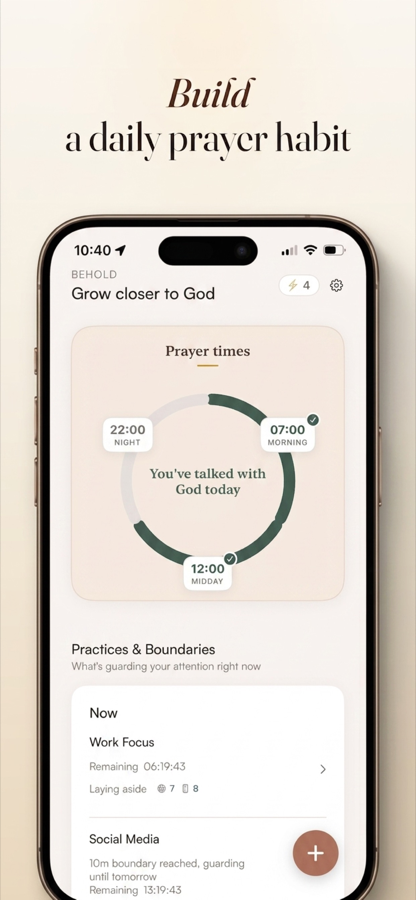
How Behold does it: you set Prayer Times, choose which apps go quiet during them, and those apps stay locked until you’ve prayed. Usually about sixty seconds, guided, so you’re never staring at a blank screen. No ignore button.
What this looks like on a normal Tuesday
You wake at 6:30. You reach for the phone. Instagram doesn’t open, because the Prayer Time is running.
You get four prompts: Praise, Repent, Ask, Yield. You say something true about God, name one thing you’re sorry for, ask for what you need today, and hand the day over. A minute, maybe less on a rushed morning.
Then the apps unlock and the day proceeds. But it proceeds from a different starting point, and you can feel the difference by about day four.
Across the week the Prayer Ring shows the shape of it: what you kept, what you drifted past. Not a streak counter designed to make you anxious about breaking it. A picture, so you can see the actual pattern instead of guessing at it.
Boundaries handle the rest of the day: per-app daily limits you set once. Practices protect specific windows (work, dinner, Sunday morning) where the phone should be quiet whether or not you’ve prayed.
The honest limits
Behold is built on Apple’s Screen Time framework, because on iPhone that is the only real way to block an app. That framework has one unavoidable gap: someone holding your unlocked phone can go into Settings and disable any Screen Time app, Behold included. No iOS app can close that gap.
What Behold removes is the thing that actually broke your old limits: the ignore button. Your habit lives in the one-tap zone. It does not survive a trip through Settings menus. In practice, that gap between “one tap” and “deliberate multi-step decision” is where the whole battle is won.
If you want more than that, have someone else set your Screen Time passcode. Then the escape route runs through a person who will ask why.
The reframe worth keeping
You have been treating this as a discipline problem for years, and it hasn’t moved. Try treating it as a design problem for one week.
You are not weak. You are running a habit loop against a device engineered by very good teams to win that loop, with a self-imposed limit that costs one tap to dismiss. Change the cost and the outcome changes. No new virtue required.
Set one Prayer Time. Lock one app. See what Friday looks like.
Try it tomorrow morning
Set one Prayer Time. Pick one app. That is the whole setup, and it takes about two minutes.