How to block apps until you pray
The full setup: choosing your Prayer Times, picking which apps lock, and what actually happens when you reach for your phone.
By the Behold team · Updated
Short answer: on iPhone you can block apps until you pray by installing Behold, setting one or more Prayer Times, and choosing which apps those times apply to. When a Prayer Time starts, the apps you chose stay locked until you complete a short guided prayer, about sixty seconds. There is no ignore button on the block screen. Setup takes roughly two minutes.
Here is the whole walkthrough: what to choose, what actually happens when you reach for your phone, and what to do the first time you get stuck.
Step 1: Decide when you want to pray
Behold is built around Prayer Times: windows in your day when your phone waits for prayer.
Start with one. The morning is almost always the right one, because the morning is where the damage is: you wake up, you reach for the phone, and twenty-five minutes disappear before you have said a word to God. If you fix the morning, the rest of the day follows more easily than you’d expect.
Set it for the ten or fifteen minutes after you normally wake up. Not the moment your alarm goes off, but the window where you’d realistically be sitting up. If you wake at 6:30, a 6:35–7:15 window is generous and forgiving.
Add midday and evening Prayer Times later, once the morning one is boring. Boring is the goal. Boring means it’s a habit.
Step 2: Choose which apps lock
This is the step people get wrong, so be deliberate.
Lock the apps your thumb opens without asking. Instagram, TikTok, X, YouTube, Reddit, Facebook, the news app, the game. You know which ones. If you had to think about whether an app belongs on the list, it probably doesn’t.
Do not lock the utilities. Messages, Phone, Maps, Calendar, banking, your camera. Locking those creates an emergency in week one, and an emergency is a permanent excuse to switch the whole thing off.
Two to four apps is a good first list. You can add more once the pattern is set.
Step 3: Set your Boundaries and Practices (optional, but do it eventually)
Two things make this survivable in a real week.
Boundaries are daily per-app limits: the amount of a given app you actually want in a day, rather than the amount you drift into. Set them once you’ve lived with Prayer Times for a week or two, so you’re setting a number based on reality instead of aspiration.
Practices are protected windows: work hours, Sunday morning, dinner, small group. Times when you want the phone quiet regardless of whether you’ve prayed. This is what keeps the app from being something that only exists at 6:40am.
The whole setup is: one Prayer Time, two or three apps. Everything else is refinement you can do next week. Behold is free to download on the App Store.
Step 4: What actually happens
You wake up. You reach for your phone. You don’t decide to, you just do it, the way you’ve done it every day for years. Your thumb lands on Instagram.
Instead of the feed, you get a block screen. It does not have a snooze. It does not have “5 more minutes”. It does not have a passcode field. It has one way forward: pray.
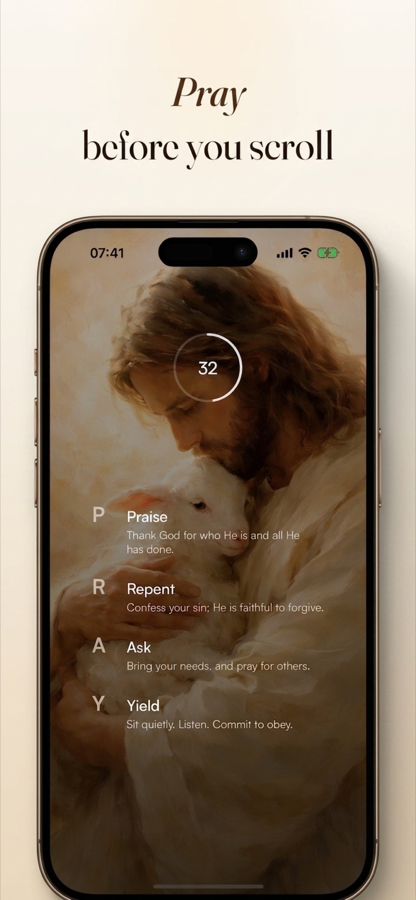
You tap through, and Behold gives you P.R.A.Y.:
- Praise. Say something true about God. Not clever. True.
- Repent. Name one thing. One is enough.
- Ask. For today, for someone, for help with the thing you’re dreading.
- Yield. Hand the day over. “Not my will.”
Four prompts. About a minute. When you’re done, the apps unlock and your phone is your phone again.
The first morning this feels like an interruption. By the fourth or fifth morning something shifts: you start reaching for the phone because the prayer is on the other side of it. The reflex that was working against you starts working for you.
Step 5: When you don’t know what to say
Almost everyone hits this in the first week. You get through the block screen, the prompt says Praise, and your mind is completely blank.
That is normal and it is not a failure. A few things that help:
- Borrow the words. The prompts give you starting phrases. Use them verbatim if you need to. Praying someone else’s words is not cheating. It is most of church history.
- Be short and specific. “Thank you that I woke up. I’m sorry about how I spoke to her last night. Please help with the 10am. I’ll take today as it comes.” That is a complete prayer.
- Don’t perform. Nobody is listening but God, and He already knows the situation. You are not writing a sermon.
If you want the fuller version of each step, read the P.R.A.Y. method guide.
Step 6: The honest part
Behold runs on Apple’s Screen Time framework, the same one every iPhone blocker uses. That framework has a limit that applies to all of them: someone holding your unlocked phone can go into Settings and switch off any Screen Time app, including this one. No app on iOS can stop that.
What Behold removes is the ignore button: the one-tap dismissal that made your old Screen Time limits meaningless. That’s the difference that matters, because the reflex operates in the one-tap zone. It does not operate in the go-to-Settings-and-dig-through-menus zone.
If you want the wall higher, have someone else set your iPhone’s Screen Time passcode and not tell you. Then getting around Behold means asking a human being. That is an iPhone feature, and it is very effective.
Step 7: The first week, realistically
Day 1–2. Mildly annoying. You’ll try to tap past it at least once out of pure reflex.
Day 3–4. You start praying before you reach for the phone, just to get ahead of it. This is the whole point and it happens faster than people expect.
Day 5–7. You will miss one. You’ll oversleep, or the morning will get hijacked, and you’ll drift past the Prayer Time. Do not treat this as the end of the experiment. The Prayer Ring shows you the day’s rhythm (kept, missed, still ahead) so you can see the pattern without turning it into a scoreboard you have to defend. Missing a day is data, not a verdict.
Week 2. Add a second Prayer Time, or a second app, or a Boundary. One change at a time.
Common questions
Can I still get to my apps in an emergency? The apps you didn’t lock are always available: Phone, Messages, Maps. That’s why you should not lock them.
What if a Prayer Time lands in a meeting? Move the Prayer Time, or set a Practice covering your work hours. The schedule should fit your life, not fight it.
How long does the prayer take? About sixty seconds if you’re brief. Longer if you want. There is no minimum you have to sit through.
Start with one Prayer Time and one app tomorrow morning. That’s the whole ask.
Try it tomorrow morning
Set one Prayer Time. Pick one app. That is the whole setup, and it takes about two minutes.